Drift
Policies set in 2019 are running against a Microsoft tenant that looks nothing like 2019. Nobody owns keeping them current.
Microsoft 365 and Azure Security Assessment
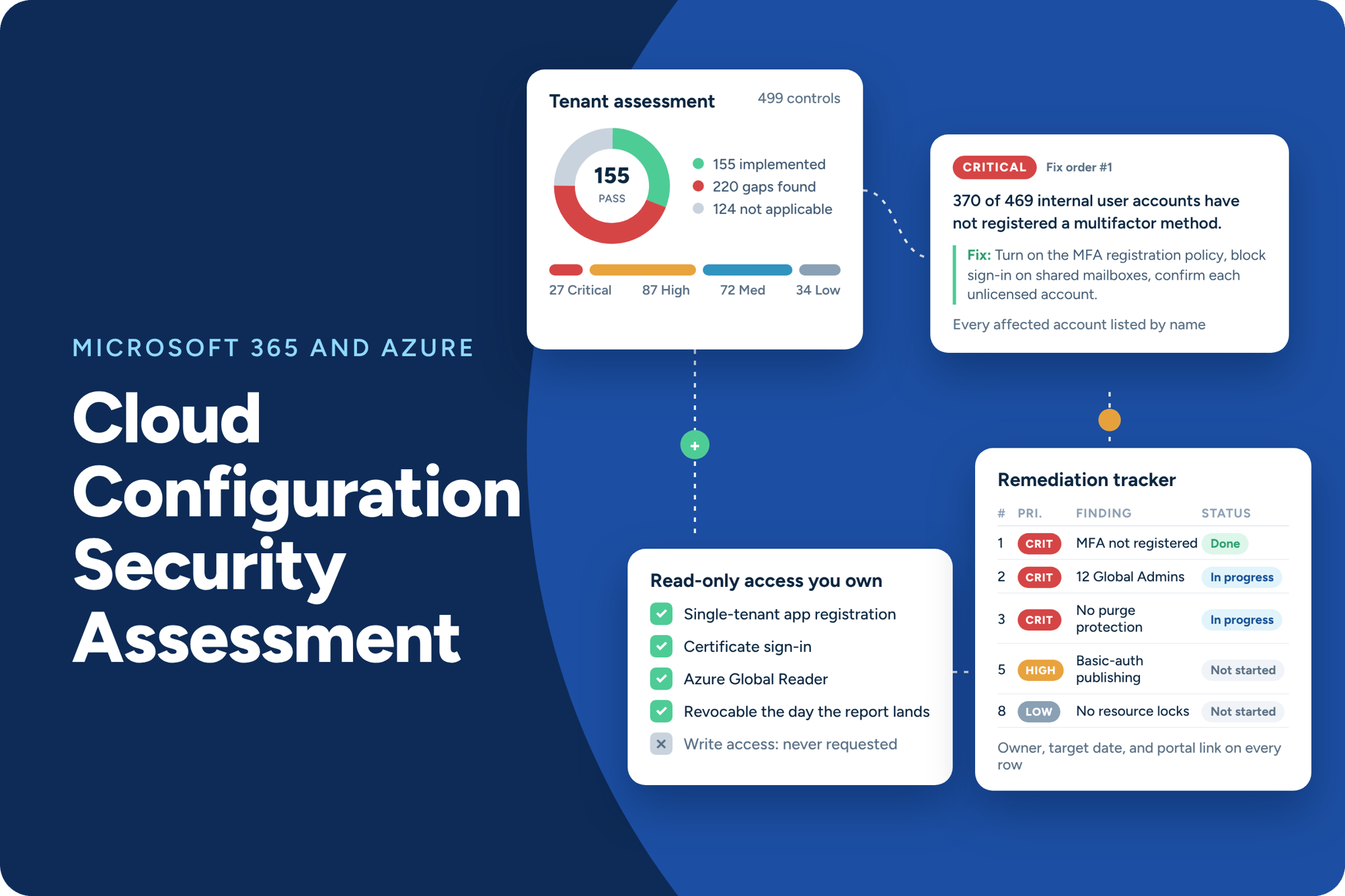
Your conditional access policies were set up during migration. Microsoft has changed its security defaults hundreds of times since. Rivial checks about 500 security settings across your tenant with read-only access you own, and hands you two things: an executive summary with your number and the gaps that matter most, and a full risk-rated workbook that names every account and resource that failed, ranked, with a fix for each.
Most organizations moved to Microsoft 365 five, six, or seven years ago. A vendor set up the conditional access policies during migration, everyone moved on, and those policies have not been touched since. Meanwhile Microsoft changes security defaults, retires old settings, and ships new recommendations every month. Reading those updates is easy. Implementing them is a full-time job no one on your team has. So the gap between how your tenant is configured and how it should be configured grows quietly, year after year, while more of the organization moves into it: email, files, identity, and now AI.
Policies set in 2019 are running against a Microsoft tenant that looks nothing like 2019. Nobody owns keeping them current.

Email, files, identity, and soon Copilot all live in one tenant. One compromised environment is the whole organization, not one system.
Most IT leads cannot state their Secure Score without looking it up, and a good score can sit on top of real gaps the score never checks.
FDIC and NCUA attention is shifting to cloud and AI use. "Our vendor set that up" is not an answer that holds up in an exam.
When a Microsoft 365 tenant is compromised, the attacker does not need to bring anything in. The tools are already there. Remote wipe, mail forwarding, admin role assignment, and access to every file the organization has moved into SharePoint are built-in features, and in a tenant nobody has hardened they work for whoever holds the credentials.
That is what concentration risk looks like now. Trusting Microsoft with everything was probably the right call. Trusting Microsoft is not the same as configuring Microsoft. The configurations are yours, the drift is yours, and when the examiner or the attacker shows up, "our vendor set that up in 2019" belongs to you too.
Why this matters now
Most IT leaders cannot state their Secure Score without looking it up, and when they do, the number does not say much. Microsoft itself says Secure Score is not a risk measure: it weights improvement actions, not threats, and it only counts the settings Microsoft chose to score.
An organization can hold a strong score and still have shared mailboxes that accept direct sign-in, standing Global Administrator roles on everyday accounts, and backups that one admin action can erase.
Rivial checks about 500 controls across identity, email, collaboration, compute, storage, and databases, well beyond what the score covers, and rates each gap by the threat it exposes you to. Guessing is not a posture.
We confirm your Microsoft 365 license, which Azure subscriptions are in scope, and your maturity target: Baseline, the settings every organization should meet, or Enhanced, which adds defense-in-depth controls on top.
Your team creates a single-tenant app registration you own and a guest reader account, following our access guide. No write role is requested. You can revoke it the day the report lands.
Rivial collects the configuration of about 500 security controls across Microsoft 365 and Azure. Services you do not use are recorded as not applicable, so the score reflects your environment.
Every finding is validated by a Rivial analyst against the collected evidence before it reaches your report. Findings, not recommendations. Nothing is reported as Critical until it has been confirmed.
For the few settings read-only access cannot see, you receive a short request listing the minimum role, the exact steps, and the file to return. Screenshots or a screen share both work.
A one-hour meeting with your IT leadership to walk the executive summary and the top of the fix list, with an optional management response to add business context to any finding.
Three phases. Your team's total time is about five to ten hours. The calendar is set mostly by how quickly access is granted, not by our hours.
We confirm license, subscriptions, and maturity target. Your admins create the read-only app registration and guest reader account from our guide, usually one to three hours of their time.
Rivial runs the collection, rates every control, and an analyst validates each finding against the evidence. You receive a short evidence request for the few settings read-only access cannot see.
You receive the executive summary and the risk-rated remediation workbook, walk the priorities with us in a one-hour readout, and record management responses on the findings that need your context.
lean security teams served
in assets secured
in risk reduced
controls assessed per tenant
— Mike Slone, AVP of Information Security @ UK Credit Union
— Richard Roark, Bay Federal Credit Union
— David Armstrong, AVP Information Security @ Rogue Credit Union
Policy Updates: Review and add AI-related content to existing policies, employee handbooks, and security protocols.
New AI Policy: Establish a dedicated AI risk management policy, including oversight teams, compliance processes, and data security measures.
Procurement & Change Management: Address AI in procurement, shadow IT risks, and assess third-party software updates introducing AI.
Issue Tracking: Update issue tracking systems to include AI- related risks and performance issues.
Risk Appetite: Adjust loss tolerance to accommodate AI- driven benefits and risks.
Data Types: Assess changes in data types and volumes due to AI integration.
Information Systems: Identify and track AI’s impact on existing systems and business processes.
Controls & Testing: Implement and regularly test AI-specific security controls, ensuring systems operate as intended without introducing new risks.
Continuous Testing: Ensure ongoing evaluation of AI systems for model drift, bias, and other risks.
Streamlined Compliance: Use integrated platforms to manage cybersecurity and AI compliance efforts together, ensuring continuous oversight.
Third-Party Monitoring: Enhance vendor security assessments with AI-specific safeguards and adversarial testing.
Data Security: Implement robust data access controls and secure storage practices for AI systems.
Model Governance: Ensure continuous AI model validation and governance in third-party solutions.
AI-Specific Playbooks: Develop tailored incident response plans for AI risks, including model drift and other AI-related failures.
Business Unit Involvement: Ensure business units play a key role in responding to AI-related incidents, alongside IT and Cyber teams.
Secure Score weights improvement actions, and Microsoft says it is not a risk measure. Rivial names the failing objects, rates each finding against a threat scenario, and hands over the fix steps and the evidence trail an examiner asks for.
We never ask for it. The access is read-only, sits on an app registration you own, and is easy to revoke.
Good. The remediation workbook can be handed to them directly, and the executive summary gives you an independent view of what they have configured.
About five to ten hours across access setup, the evidence request, and a one-hour readout.
No. It is an advisory assessment against the Rivial Cloud Configuration Standard. It does not certify or attest to anything.
The score counts the controls in the maturity target you chose, Baseline or Enhanced, and excludes services you do not use. Enhanced is the full standard including defense-in-depth settings, so a first score at that target is often lower than expected. It is a starting point, not a benchmark.
The assessment works on a Microsoft 365-only tenant. Smaller scope, same method, lower cost.
Microsoft keeps changing the tenant underneath you, and Copilot raises the stakes. Most organizations treat this as an annual or every-other-year check. Because inherent risk is fixed per control, each report compares cleanly to the last.
Yes. A re-test is a separate, smaller engagement: Rivial re-collects the settings and delivers an updated summary showing what moved. Because inherent risk is fixed per control, the before and after compare cleanly for the board and the examiner.
Our solution integrates AI risk management directly into our current cyber risk model, ensuring consistency and reducing duplication. This allows you to manage AI risk with the same teams, processes, and tools you already use for cybersecurity.
Our solution ensures ongoing testing of controls and ensures that your AI initiatives align with industry regulations and standards, including NIST AI RMF. Our platform helps you build an AI strategy that not only meets regulatory requirements but helps you manage it going to build trust with members and customers.